
Running a small business in 2026 often means managing far more than sales.
Customer relationships, marketing campaigns, invoices, accounting, team communication, project management and everyday administration can quickly become difficult to coordinate. Fortunately, cloud based software has made it possible for small teams to access sophisticated business tools without building their own technology infrastructure.
This is where SaaS becomes particularly valuable.
Software as a Service allows businesses to use applications through the internet, usually through a subscription model. Instead of installing and maintaining everything locally, a business can choose the services it needs and expand its technology stack as the company grows.
The challenge is choosing the right combination.
There are thousands of SaaS products available, and adding too many can create a new problem: instead of simplifying work, the business ends up managing dozens of disconnected applications.
The better approach is to build a practical software stack around four fundamental areas: customer relationships, marketing, finance and productivity.
What Is SaaS and Why Does It Matter for Small Businesses?

SaaS stands for Software as a Service.
Instead of purchasing software once and maintaining it on a company's own computers, businesses generally access SaaS applications online through a subscription or service plan.
This model can offer several advantages for smaller companies.
• Lower upfront technology investment
• Access from multiple devices
• Automatic software updates
• Easier collaboration
• Flexible user management
• Cloud based data access
• Ability to scale as the business changes
Microsoft 365, for example, combines business email, productivity applications, collaboration tools, security controls and optional AI assistance within its business offering.
The important point is that SaaS is not a single category of software.
It is a delivery model that appears across almost every part of modern business.
Best SaaS Tools for Customer Relationship Management
Customer information can become difficult to manage surprisingly quickly.
A few customers may be easy to remember. Hundreds or thousands of contacts are not.
A CRM, or customer relationship management platform, gives businesses a central place to organize customer records, interactions, sales opportunities and follow up activities.
One prominent option is HubSpot CRM.
HubSpot's current small business CRM includes contact management, deal pipelines, task management, reporting, communication history and integrations. Its platform also provides free CRM functionality alongside paid tools for businesses that need more advanced capabilities.
For a small company, a CRM can help answer practical questions such as:
• Who are our active prospects?
• Which leads need follow up?
• What stage is each deal at?
• When did we last contact a customer?
• Which marketing channels are generating opportunities?
• Which customers need support?
A CRM becomes especially valuable when customer information would otherwise be scattered between spreadsheets, email inboxes and individual employees' notes.
SaaS Marketing Tools for Small Businesses
Marketing can involve everything from social media graphics and email campaigns to advertising, landing pages and performance analysis.
The right SaaS tools can help small teams handle these activities without requiring a large marketing department.
Canva for Visual Marketing
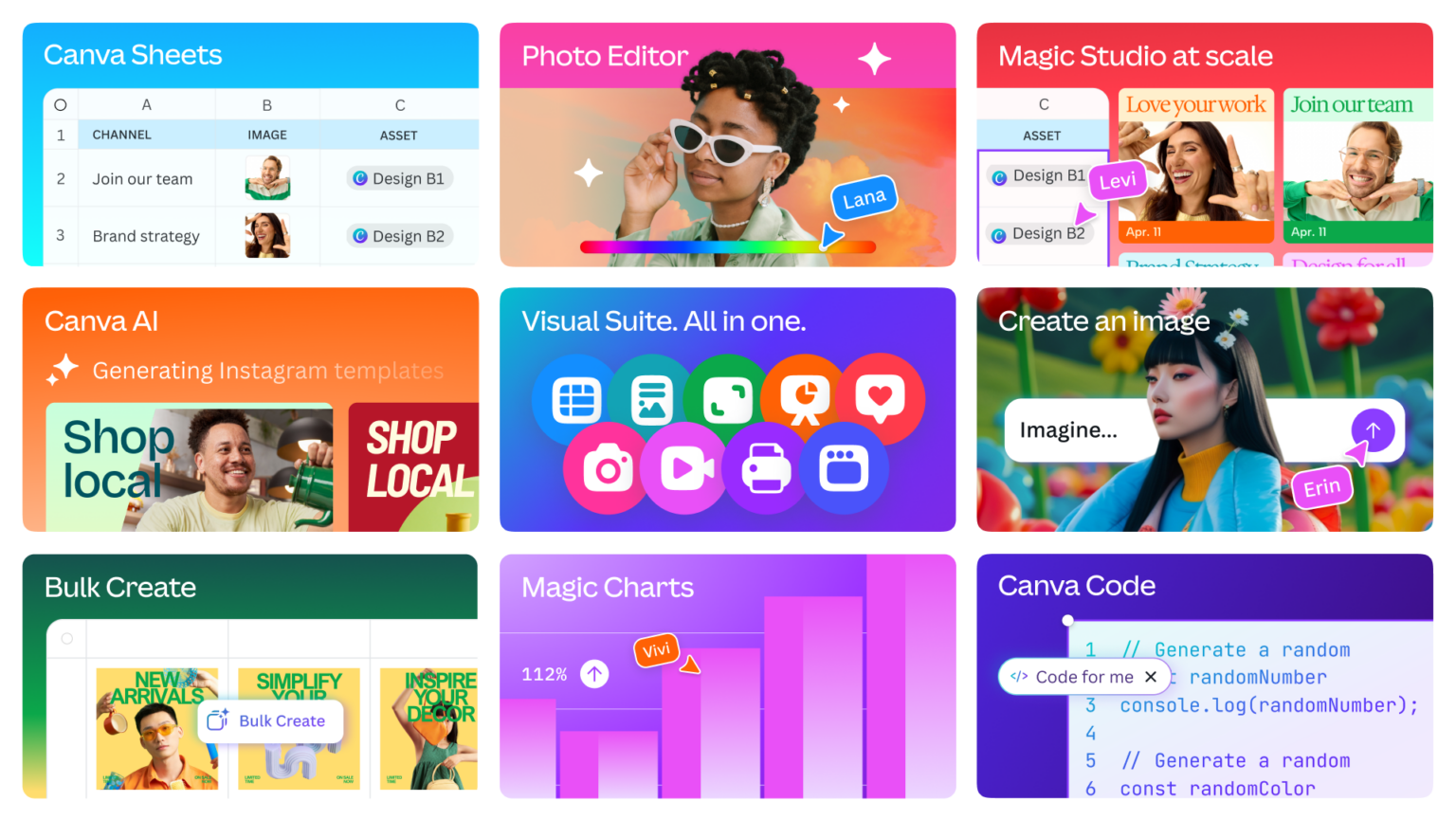
Canva Business is designed for individuals and small teams that need to create and manage branded content.
Its current business offering includes AI powered content creation, brand management, team collaboration, advertising tools and data visualization features. Canva also supports integrations with services such as HubSpot, Google Drive, LinkedIn and other business tools.
For a small business, this can be useful for creating:
• Social media graphics
• Presentations
• Advertisements
• Flyers
• Marketing videos
• Sales materials
• Branded documents
The advantage is consistency. Instead of having every employee create graphics from scratch, a business can establish brand assets and templates that make visual content easier to produce.
Email and Customer Marketing

Email marketing remains an important part of customer communication, particularly for businesses that rely on repeat purchases, newsletters or lead nurturing.
A marketing SaaS platform can help with:
• Subscriber management
• Email campaigns
• Automated sequences
• Customer segmentation
• Lead nurturing
• Campaign reporting
• Personalized communication
Some CRM platforms combine these capabilities with customer records, making it easier to connect marketing activity with sales outcomes.
The important consideration is not simply how many automation features a platform offers.
A small business should choose software that its team will actually use consistently.
SaaS Tools for Business Finance and Accounting
Financial administration is another area where SaaS can reduce manual work.
Online accounting platforms can help businesses manage areas such as:
• Income and expenses
• Invoices
• Financial reports
• Cash flow information
• Tax related records
• Business transactions
• Payment tracking
The exact features vary between providers and countries, so businesses should choose accounting software that supports their local tax and reporting requirements.
Cloud accounting can also make collaboration easier because authorized users and accounting professionals can work from the same system rather than passing files back and forth.
For small companies, the biggest benefit may simply be having financial information organized in one place.
Productivity SaaS for Everyday Work

Productivity software forms the foundation of many small business technology stacks.
Employees may need to write documents, analyze spreadsheets, manage meetings, communicate with colleagues and collaborate on files.
Microsoft 365 is one example of a broad productivity SaaS ecosystem. Its business offering includes professional email, productivity applications, collaboration capabilities, security features and administrative controls, with Copilot available for AI assisted work in supported plans.
A productivity platform can help bring together:
• Documents
• Spreadsheets
• Presentations
• Meetings
• Team communication
• Cloud storage
• AI assisted work
The benefit of an integrated productivity suite is that employees do not necessarily need separate applications for every basic task.
Project Management and Team Collaboration
As soon as a business has multiple projects running simultaneously, simple to do lists can become difficult to manage.
Project management SaaS can provide a shared view of responsibilities, deadlines and progress.
Useful features include:
• Task assignments
• Project boards
• Deadlines
• Recurring tasks
• Team comments
• File attachments
• Progress tracking
• Notifications
For a small company, simplicity matters.
A project management platform should make work clearer rather than creating another administrative task that employees have to maintain.
AI Is Changing the SaaS Experience
One of the biggest changes in SaaS is the integration of artificial intelligence.
AI features are increasingly appearing inside CRM, marketing, productivity, design and customer service applications.
For example, HubSpot currently promotes AI capabilities across its customer platform, including tools for content creation, assistance and AI agents.
Microsoft offers Copilot as an AI assistant within supported Microsoft 365 business applications.
Canva also incorporates AI into its business offering for content creation and visual workflows.
For small businesses, the most useful AI features are often those that remove repetitive work.
Examples include:
• Summarizing customer conversations
• Drafting emails
• Creating marketing variations
• Organizing information
• Generating first drafts
• Analyzing business data
• Turning notes into structured content
AI should still be treated as an assistant rather than an automatic replacement for human review.
A Practical SaaS Stack for a Small Business
A small company does not need dozens of applications.
A simple technology stack might look like this:
Business function | SaaS category | Example |
|---|---|---|
Customer management | CRM | HubSpot |
Visual marketing | Design and marketing | Canva |
Email and campaigns | Marketing automation | Email marketing platform |
Accounting | Finance and accounting | Cloud accounting platform |
Documents and communication | Productivity suite | Microsoft 365 |
Projects | Project management | Task management platform |
Automation | Workflow automation | Automation platform |
Analytics | Business intelligence | Reporting platform |
The specific products should depend on the company's industry, size, budget and existing systems.
The goal is not to collect software.
The goal is to create a connected workflow.
How to Choose SaaS Tools Without Overspending
SaaS subscriptions can appear inexpensive individually.
The problem appears when ten or twenty subscriptions are being paid every month.
Before adding another tool, ask:
What problem does it solve?
If the answer is unclear, the software may not be necessary.
Does the team already have this feature?
A productivity suite or CRM may already include functionality that another application is selling separately.
Does it integrate with existing systems?
Data that cannot move between applications can create unnecessary manual work.
Is the pricing predictable?
Check user based pricing, feature restrictions, usage limits and future upgrade requirements.
Can the business actually use it?
A feature rich application is not necessarily valuable if the team finds it too complicated.
Can data be exported?
Businesses should consider how easily they can retrieve their information if they eventually move to another platform.
SaaS Security and Business Data
Convenience should not come at the expense of security.
Small businesses often store highly valuable information in SaaS applications, including customer records, financial information, employee data, business documents and marketing assets.
Important considerations include:
• Strong account authentication
• Multi factor authentication
• User permissions
• Data encryption
• Backup policies
• Administrative controls
• Security notifications
• Data export capabilities
• Vendor security documentation
Microsoft's current business offering, for example, emphasizes centralized identity, security, compliance and privacy controls for business customers.
Businesses should also review which employees can access sensitive information.
Not every team member needs access to every customer record, financial report or administrative setting.
SaaS Tools Comparison for Small Businesses
Need | What to prioritize | Example solution |
|---|---|---|
CRM | Contacts, pipelines, follow ups and reporting | HubSpot |
Marketing design | Templates, AI creation and brand controls | Canva |
Accounting | Invoicing, expenses and financial reporting | Cloud accounting software |
Productivity | Email, documents, spreadsheets and meetings | Microsoft 365 |
Project management | Tasks, deadlines and collaboration | Project management SaaS |
Automation | Connections between repetitive workflows | Workflow automation SaaS |
Analytics | Business reporting and performance visibility | Analytics platform |
These examples represent categories rather than universal recommendations. A company's needs, location, existing software and budget should determine the final selection.
How to Build a Better SaaS Strategy in 2026
The strongest SaaS strategy is usually not about having the largest technology stack.
It is about reducing unnecessary complexity.
Start with the core workflow:
Customer acquisition
Marketing tools attract and engage potential customers.
Sales
CRM software organizes prospects and opportunities.
Operations
Productivity and project management tools coordinate daily work.
Finance
Accounting software organizes financial information.
Analysis
Reporting tools help the business understand performance.
Automation
Connected SaaS applications reduce repetitive manual tasks.
When these systems communicate effectively, employees spend less time transferring information between applications.
Final Thoughts
SaaS has made sophisticated business software much more accessible to small companies.
In 2026, a small team can use cloud based technology for customer management, marketing, accounting, collaboration, project management and AI assisted work without maintaining a large internal technology department.
The challenge is no longer simply finding software.
It is choosing software that fits together.
A useful SaaS stack should reduce repetitive work, keep information organized, support collaboration and provide room for the business to grow.
Start with the problems that consume the most time. Choose tools that solve those problems clearly. Connect them where practical, review subscriptions regularly and avoid paying for features that the team does not actually use.
The right SaaS strategy is not about having more applications.
It is about creating a simpler way to run the business.
Frequently Asked Questions
1. What is SaaS?
SaaS stands for Software as a Service. It generally refers to software that customers access through the internet rather than installing and maintaining entirely on their own systems.
2. Why is SaaS useful for small businesses?
SaaS can provide access to business software without requiring large upfront infrastructure investments. It can also support remote access, collaboration, automatic updates and scalable user management.
3. What SaaS tools does a small business need?
Most businesses can begin with a few core categories such as CRM, productivity, accounting, marketing and project management. The exact combination depends on the company's operations.
4. Is HubSpot suitable for small businesses?
HubSpot currently offers CRM functionality specifically for small businesses, including contact management, deal pipelines, task management, reporting and integrations. It also provides free CRM tools alongside paid products.
5. Can Canva be used for business marketing?
Yes. Canva Business is designed for individuals and small teams and provides branded content creation, AI assisted design, marketing capabilities, collaboration and integrations.
6. Is Microsoft 365 a SaaS platform?
Microsoft 365 is delivered as a cloud based subscription service and provides business productivity applications, email, collaboration, security and administration features. Supported plans can also include Copilot.
7. Should a small business use multiple SaaS applications?
Multiple applications can be useful when each solves a specific problem and integrates well with the rest of the technology stack. Too many disconnected subscriptions can increase costs and administrative complexity.
8. What should I check before buying SaaS software?
Look at pricing, features, integrations, security, user permissions, support, data export options and whether the application actually solves a problem your team currently has.
9. How is AI changing SaaS?
AI is increasingly being integrated into SaaS products for tasks such as content creation, data analysis, customer assistance, automation and productivity. The most useful applications are generally those that reduce repetitive work while leaving important decisions to people.
10. What is the biggest mistake businesses make with SaaS?
One common mistake is buying software based on a long feature list rather than a specific business need. A smaller number of well integrated tools can sometimes be easier to manage than a large collection of disconnected applications.