Choosing Web Hosting is one of those decisions that can look simple at first and become surprisingly complicated once you start comparing plans.
Storage limits, bandwidth, backups, SSL certificates, content delivery networks, WordPress support, ecommerce features, AI tools and renewal prices all appear in hosting comparisons. Then there are different types of hosting, including shared hosting, managed WordPress hosting, cloud hosting and VPS hosting.
For a personal blog, the requirements may be relatively straightforward.
A local business website has different priorities. It may need professional email, reliable performance, contact forms and enough capacity to handle occasional traffic spikes.
An online store has even more at stake. Hosting needs to support product pages, shopping carts, payments, customer accounts and potentially large traffic increases during promotions.
That is why the best Web Hosting option in 2026 is not necessarily the same for everyone.
The better approach is to start with the website you are building, understand what it needs today, and then choose a platform that can support its realistic next stage of growth.
What Should You Look for in Web Hosting in 2026?
A good hosting plan should provide more than server space.
Before choosing a provider, consider these areas:
• Performance and loading speed
• Storage capacity
• Backup frequency
• Security features
• SSL certificates
• CDN availability
• WordPress compatibility
• Ecommerce support
• Scalability
• Customer support
• Ease of management
• Renewal pricing
• Data center availability
• Migration assistance
• AI and automation features
The right balance depends on the project.
A small portfolio website does not need the same infrastructure as an online store processing hundreds of orders.
Web Hosting for Small Businesses

A business website often has a very specific job.
It may generate leads, display services, collect enquiries, provide appointment information, publish company updates or direct customers toward a physical location.
That means reliability and ease of management are usually more important than having the largest possible collection of technical features.
For many small businesses, managed WordPress hosting or straightforward shared hosting can be enough when traffic is modest.
Hostinger currently offers managed WordPress hosting with features including CDN, backups, AI tools and 24/7 support. Its current plans also provide options that can accommodate multiple websites and growing projects.
Bluehost is another option for businesses building around WordPress. Its current small business guidance emphasizes choosing hosting according to whether the website generates leads, manages bookings, handles sales or supports customer accounts.
The important point is to avoid paying for infrastructure you do not currently need.
A five page consulting website does not automatically require a high end VPS.
Web Hosting for Blogs

Blogs can have very different hosting requirements.
A personal blog with a few hundred visitors a month has a very different workload from a publication receiving millions of page views.
For a new or growing blog, WordPress hosting can be an attractive option because the hosting environment and website software are designed to work together.
The main features to consider include:
Storage
Images and media files can consume space quickly, especially for photography, travel, fashion and food websites.
Backups
Regular backups provide a way to restore the website if an update or configuration change causes a problem.
Performance
Fast hosting can help create a smoother experience for readers, particularly when pages contain images, videos and interactive elements.
CDN
A content delivery network can help serve website assets from infrastructure closer to visitors.
Scalability
If an article suddenly attracts significant traffic, having an upgrade path can be useful.
Hostinger's current WordPress plans include backups, CDN access, AI tools and support, with higher plans offering additional storage and more resources.
For bloggers, the most useful hosting plan is usually the one that handles the current publishing workflow comfortably while leaving room for realistic growth.
Web Hosting for Online Stores
Online stores require more careful planning.
A blog can potentially tolerate a short period of reduced availability without immediately affecting transactions.
An ecommerce website has customers browsing products, adding items to carts and completing purchases.
The hosting environment therefore needs to support a more complex application.
Important considerations include:
• Reliable performance
• Secure connections
• Regular backups
• Database performance
• Caching
• CDN support
• Ecommerce platform compatibility
• Payment integrations
• Scalability
• Security monitoring
• Staging capabilities
For WordPress based stores, managed WooCommerce hosting can simplify some of this work.
Hostinger's current managed WooCommerce service includes automatic WordPress and WooCommerce updates, malware scanning, vulnerability scanning, backups, object caching and staging tools.
Bluehost also offers WooCommerce specific hosting with preinstalled WooCommerce, SSL, CDN, NVMe storage and support.
Hosted Ecommerce vs Self Hosted Ecommerce
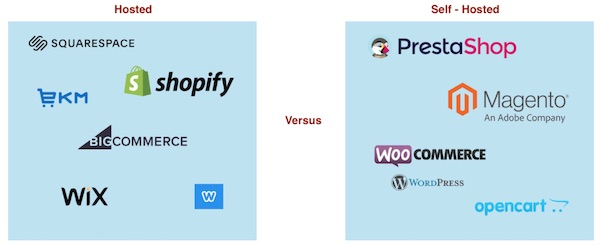
There are two broad approaches to running an online store.
Hosted Ecommerce
Platforms such as Shopify bundle the ecommerce software and hosting into one service.
This means the store owner does not need to purchase conventional hosting separately.
Shopify's current plans include web hosting, SSL, unlimited bandwidth and an online store, while its platform also includes ecommerce tools and an AI assistant called Sidekick.
This can simplify the technical side of running a store.
Self Hosted Ecommerce
With a platform such as WordPress and WooCommerce, the merchant chooses a hosting provider and manages more of the website stack.
This can provide greater flexibility over themes, plugins, hosting configuration and functionality.
The tradeoff is that there are more moving parts to maintain.
Neither approach is automatically right for every business.
A store owner who wants simplicity may prefer an integrated platform.
A business that wants extensive control over WordPress may prefer managed WooCommerce hosting.
Shopify for Online Stores
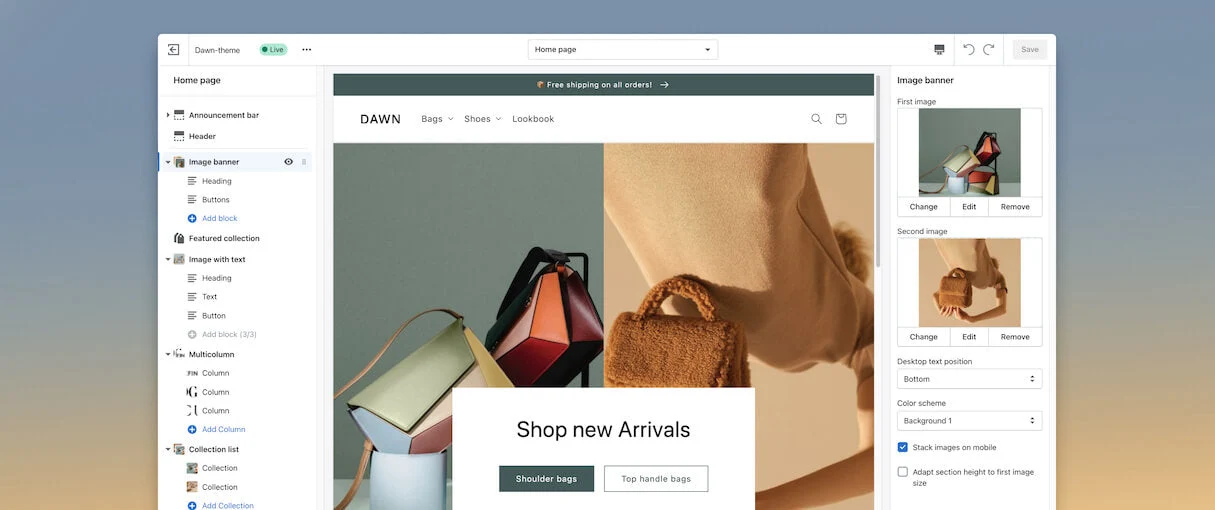
Shopify deserves separate consideration because it changes the meaning of Web Hosting.
You do not purchase traditional hosting separately and then install an ecommerce application.
Hosting is part of the Shopify subscription.
According to Shopify's current India pricing page, its plans include unlimited web hosting, custom domains and free SSL certificates. The platform also includes an online store, product management, inventory tools, social and marketplace selling and AI features.
For Indian businesses, the current annual pricing shown by Shopify starts at ₹1,499 per month for Basic, with higher tiers aimed at small teams and businesses requiring more advanced functionality.
Shopify's current ecommerce guidance also distinguishes hosted SaaS ecommerce from self hosted stores, noting that hosting, SSL and several infrastructure responsibilities are bundled into its platform.
This can make budgeting and management easier for merchants who would rather focus on products, customers and marketing than server administration.
Hostinger for Small Businesses, Blogs and Stores
Hostinger offers several hosting approaches under one platform.
Its current India plans include standard Web Hosting, WordPress hosting, ecommerce capabilities and cloud hosting.
The current Web Hosting page lists features such as free SSL, backups, CDN access, AI tools and support. Higher plans provide additional storage, websites and backup capabilities.
For WordPress users, Hostinger provides managed WordPress hosting with AI tools and support.
For WooCommerce users, it offers managed WooCommerce hosting with features designed around online stores, including caching, backups, security scanning and staging.
This makes the platform relevant to several types of projects, from a simple business website to a growing ecommerce operation.
The important step is choosing the plan according to resource requirements rather than simply selecting the cheapest available option.
Bluehost for WordPress and WooCommerce
Bluehost has a strong focus on WordPress and WooCommerce.
Its current WooCommerce hosting offering includes WooCommerce preinstalled, SSL, CDN, NVMe storage and 24/7 support.
For a business that already intends to build around WordPress, this can reduce the number of setup decisions required.
It is particularly worth considering when the website needs WordPress flexibility but the owner wants an ecommerce focused starting point.
As with any hosting provider, however, it is sensible to examine renewal pricing, included resources and support terms rather than judging a plan entirely by its introductory price.
SiteGround for Managed Website Projects
SiteGround is another established option for WordPress and business websites.
It is commonly considered by businesses that want managed hosting features rather than managing server infrastructure themselves.
When comparing providers in this category, look closely at features such as:
• Automatic backups
• Staging environments
• CDN services
• Security tools
• WordPress management
• Support
• Resource limits
• Renewal pricing
The goal is not simply to find the provider with the largest feature list.
It is to determine whether those features solve problems you are actually likely to encounter.
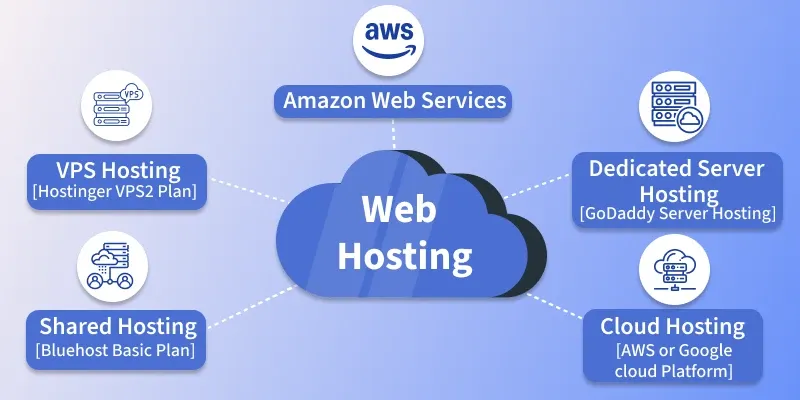
Shared Hosting vs Cloud Hosting vs VPS
Understanding hosting types can make the decision much easier.
Hosting Type | Suitable For | Main Advantage | Main Consideration |
|---|---|---|---|
Shared Hosting | Small websites and new blogs | Affordable and simple | Resources are shared |
Managed WordPress | WordPress blogs and businesses | Easier maintenance | Platform specific |
Managed WooCommerce | WordPress stores | Ecommerce focused tools | More specialized |
Cloud Hosting | Growing websites and businesses | Greater scalability | Can cost more |
VPS Hosting | Advanced websites and applications | More control and resources | Requires more technical knowledge |
Hosted Ecommerce | Online stores | Hosting and commerce together | Less infrastructure control |
A new local business may be perfectly comfortable with shared or managed WordPress hosting.
A busy ecommerce store may need managed WooCommerce or cloud infrastructure.
A developer running a custom application may eventually need a VPS or more advanced cloud setup.
What Type of Hosting Does a Small Business Need?
Start by asking what the website actually does.
Service Business
A consultant, photographer, agency or local professional may only need a relatively simple WordPress website.
Priorities include:
• Reliability
• SSL
• Backups
• Contact forms
• Good performance
Content Website
A blog or publishing site should prioritize:
• Storage
• Performance
• CDN
• Backups
• Image handling
• Scalability
Online Store
An ecommerce website needs:
• Ecommerce compatibility
• Strong security
• Reliable backups
• Database performance
• Caching
• CDN
• Scalability
• Payment integration support
Membership Website
A membership platform may require more server resources because users are logged in and the website is performing more dynamic operations.
That can make managed WordPress, cloud hosting or VPS hosting more appropriate as the project grows.
How Much Web Hosting Do You Actually Need?
Hosting plans often advertise storage prominently.
But storage is only one part of the equation.
A website can have plenty of storage and still perform poorly if its database, server resources or application configuration cannot handle the workload.
Consider:
Traffic
How many visitors do you expect?
Content
Will you publish mostly text, or large images and videos?
Applications
Are you running WordPress, WooCommerce, membership software or custom applications?
Database Activity
Does the website frequently retrieve and update information?
Traffic Spikes
Could a social media post or promotion suddenly bring thousands of visitors?
Future Growth
Will the website remain small, or do you expect significant growth over the next two years?
The answers should determine your hosting level.
Why Backups Matter
Backups are easy to ignore when everything is working.
They become extremely important when something goes wrong.
A website may be affected by:
• Plugin conflicts
• Failed updates
• Human mistakes
• Security incidents
• Database problems
• Server issues
• Accidental deletions
For a simple blog, losing several days of work can be frustrating.
For an online store, losing orders, product changes or customer information can be considerably more serious.
Hostinger's current higher tier plans include daily backups and on demand backups, while its WooCommerce hosting also includes automated backups and restore capabilities.
The exact backup schedule and retention policy should always be checked before purchasing.
Website Security Should Be Part of the Hosting Decision
A hosting plan should not be evaluated on speed alone.
Security is especially important for websites that handle customer information, account credentials or payments.
Look for features such as:
• SSL certificates
• Malware scanning
• Security monitoring
• Account protection
• Automatic updates where appropriate
• Backups
• Firewall protection
• DDoS protection
For ecommerce businesses, the hosting environment is only one part of the overall security picture.
The ecommerce platform, payment provider, plugins, passwords, access controls and website configuration all matter.
Shopify, for example, states that its hosted commerce platform is Level 1 PCI DSS compliant and that its stores are PCI compliant by default.
With self hosted ecommerce, the business has more responsibility for maintaining the broader application environment.
What About AI Hosting Features?
AI has become increasingly common across hosting platforms.
Depending on the provider, AI may help with:
• Website creation
• Content generation
• Design suggestions
• SEO
• Website management
• Troubleshooting
• Ecommerce setup
• Marketing
• Development
Hostinger currently includes AI tools across several hosting plans and promotes AI assisted website creation and store management.
Shopify also includes AI features such as Sidekick, its commerce focused AI assistant, alongside its hosted ecommerce infrastructure.
These tools can be useful, particularly for people without technical teams.
But AI should be considered an additional capability rather than the primary reason to choose a host.
Reliable infrastructure, security, support and scalability still come first.
Web Hosting Comparison for Different Website Types
Website Type | Hosting Approach to Consider | Important Features |
|---|---|---|
Local business website | Shared or managed WordPress | SSL, backups, support, performance |
Consultant website | Managed WordPress | Reliability, email, security, ease of use |
New blog | Shared or managed WordPress | Storage, backups, CDN, simplicity |
Growing blog | Managed WordPress or cloud | Performance, scalability, caching |
Small WooCommerce store | Managed WooCommerce | Security, backups, caching, staging |
Growing ecommerce store | Cloud or advanced managed ecommerce | Scalability, database performance, CDN |
Large ecommerce operation | Managed cloud or enterprise ecommerce | High availability, scalability, advanced support |
Custom web application | VPS or cloud | Control, resources, deployment flexibility |
This table is a starting point rather than a universal formula.
A blog receiving unusually high traffic may need more infrastructure than a small online store.
Likewise, a local business with a complex booking system may require more resources than a simple brochure website.
How Much Does Web Hosting Cost in 2026?
The headline price is not always the real cost.
Hosting providers frequently use introductory pricing, while renewal pricing can be different.
You should check:
• Initial subscription price
• Renewal price
• Billing period
• Domain renewal
• Email costs
• Backup limitations
• Premium plugins
• CDN costs
• Additional storage
• Ecommerce transaction costs
• AI usage limits
For ecommerce businesses, the total cost can also include payment processing, applications, themes, marketing tools and fulfillment.
Shopify's current ecommerce cost guidance notes that the overall cost of an online store can include hosting, domain registration, design, apps, payment processing and marketing, with costs varying considerably depending on how the business grows.
That is why comparing only the monthly hosting price can produce a misleading picture.
A Practical Hosting Checklist for Small Businesses
Before purchasing a hosting plan, ask:
What platform will I use?
WordPress, WooCommerce, Shopify or something else?
How much traffic do I expect?
Be realistic rather than choosing based on an unrealistic future scenario.
How important is uptime?
A business that receives leads online may need stronger reliability than a personal project.
How often will I publish?
Content heavy websites can require more storage and better media handling.
Will I sell products?
If yes, ecommerce specific infrastructure may be more appropriate.
Do I need technical control?
If you do not want to manage servers, managed hosting can reduce the workload.
What happens when I grow?
Check whether upgrading is straightforward.
What is the renewal price?
Do not judge the plan entirely by its promotional price.
Common Web Hosting Mistakes
Choosing Only by Price
The cheapest plan may not provide the resources or support your website needs.
Ignoring Renewal Costs
A low introductory rate can increase after the initial term.
Buying Too Much Too Soon
A small website rarely needs enterprise infrastructure from day one.
Forgetting Backups
Backups should be part of the plan rather than an afterthought.
Ignoring Migration
If you later move providers, a simple migration process can save significant time.
Choosing a Platform Without Checking Compatibility
Make sure the host supports the software you actually intend to use.
Treating Unlimited as Unlimited Everything
Marketing terms can have resource policies and fair usage conditions behind them.
Read the plan documentation.
How to Choose Web Hosting as Your Business Grows
Your first hosting plan does not have to be your final hosting environment.
A sensible growth path might look like this:
Stage One
Start with affordable shared or managed WordPress hosting.
Stage Two
Increase resources as traffic and content grow.
Stage Three
Move to cloud or advanced managed hosting when the website needs more capacity.
Stage Four
Consider VPS or specialized infrastructure when you require greater control.
Stage Five
Larger businesses may eventually need dedicated infrastructure, managed cloud environments or enterprise ecommerce platforms.
This approach avoids paying for infrastructure before you actually need it.
Final Thoughts
The best Web Hosting for a small business, blog or online store depends on what the website needs to accomplish.
A simple local business website may benefit most from straightforward managed WordPress hosting.
A growing blog may need stronger storage, caching, CDN capabilities and an easy upgrade path.
A WordPress based store can benefit from managed WooCommerce hosting with ecommerce specific features.
A merchant who wants hosting and ecommerce management bundled together may prefer a hosted platform such as Shopify, where hosting and SSL are included with the subscription.
Platforms such as Hostinger provide several paths across general hosting, WordPress and WooCommerce, while Bluehost has dedicated WordPress and WooCommerce options.
The most important lesson is simple.
Do not choose hosting because a plan has the biggest storage number or the lowest promotional price.
Choose it because it fits the website you are actually building.
Think about performance, security, backups, support, platform compatibility, scalability and total cost.
Then consider the AI tools and additional features that can make website management easier.
In 2026, good Web Hosting is no longer just about keeping a website online.
It is about providing a dependable foundation on which a business, publication or online store can grow.
Frequently Asked Questions
What is the best Web Hosting for a small business?
The appropriate hosting depends on the website platform, traffic, technical requirements and expected growth. Managed WordPress hosting is often suitable for businesses using WordPress, while hosted ecommerce platforms can simplify stores.
What is the best Web Hosting for a blog?
A new blog can often begin with shared or managed WordPress hosting. As traffic and content grow, features such as CDN support, caching, additional storage and stronger server resources become increasingly important.
What is the best Web Hosting for an online store?
Online stores can use either managed ecommerce platforms such as Shopify or self hosted platforms such as WooCommerce with specialized hosting. The decision largely depends on how much control and technical responsibility the business wants.
Is Shopify Web Hosting?
Yes. Shopify includes web hosting as part of its ecommerce subscription. Its current plans include unlimited web hosting and free SSL, so merchants do not need to purchase conventional hosting separately.
Is WordPress hosting different from normal Web Hosting?
WordPress hosting is generally configured or managed specifically for WordPress websites. Depending on the provider, it may include WordPress installation, updates, backups, caching, security tools and other WordPress focused features.
Do online stores need special hosting?
Not always, but ecommerce websites generally have more demanding requirements than simple informational websites. Stores should consider database performance, security, backups, caching, CDN support and scalability.
Is cheap Web Hosting good enough for a small business?
It can be, particularly for a simple website with modest traffic. However, businesses should check resource limits, support, backups, security and renewal prices before choosing a low cost plan.
How much Web Hosting do I need?
There is no universal amount. A small website with limited traffic may need relatively few resources, while an image heavy blog, membership website or ecommerce store can require considerably more.
Should I choose shared hosting or VPS hosting?
Shared hosting is generally easier and more affordable for smaller websites. VPS hosting provides more control and dedicated resources but usually requires greater technical knowledge.
Do I need a CDN?
A CDN can be useful for websites serving visitors across different geographic regions because it can distribute static website assets through a network of locations. The value depends on the website, audience and hosting setup.
How important are Web Hosting backups?
They are extremely useful because they provide a recovery option after accidental changes, failed updates, security incidents or other website problems. Always check the provider's backup frequency, retention period and restoration process.
Should I look at renewal pricing?
Yes. A promotional price may apply only to the initial subscription period. Compare the regular renewal price with the resources and services included before committing to a longer plan.